An easy way to Power-on and Shutdown your computer automatically

Posted by Laxman Kudva in

Have you guys ever heard that you can control your entire system using a software?

A software - “Auto Power-on & Shut-down” helps you in automatically handling your computer, i.e., you can automatically shut down, restart, hibernate your computer at your desired time without even having to go in your computer room. Isn’t it fascinating?

auto power on shut down

How will this software help me?

Now say for example, you have free downloading plan from 2-8 in the night, and it is not possible for you to get up at 2am each day and set a downloading queue. Rather, it is too boring to get up so late just for a download. At such times, this software helps you to download your stuff without even getting up at 2am.

Features

This software has following functionality:

  1. Automatic computer start
  2. Automatic start of a downloading queue. includes :- internet download manager, utorrent.
  3. Automatic hibernation.
  4. Automatic shut down.
  5. Automatic play of a music file.
  6. Automatic start of a particular software

Share your comments on what you think.

Link: lifsoft

Download Free Avi Wmv Dvd Divx Movie Subtitles In English And Other Languages

Posted by Laxman Kudva in

Whether you are watching an Anime movie, or Greek, Chinese, or Dutch movie or even local language movies like Tamil, Telugu, Kannada or Malayalam, you can now download English/other language subtitles for most of the movies if you do not understand the language.

If you do not know what subtitles are, they are the printed text on the screen that run along with dialogues spoken in a movie or documentary. You may not understand dialogues in certain movies, either because the quality of sound may not be good or the movie may be in a different language, that’s when you need subtitles.

I have listed 12 sites below, from where you can download subtitles for most movies in avi, wmv, dvd, divx format.

1> Open Subtitles

2> SubScene

3> Subtitles - Images

4> Subdb

5> Divx Subtitles

6> Subtitles Box

7> Any Subs

8> Movie Subtitles

9> All Subs

10> Divx Movies Subtitles

11> Movie Subtitles

12> All 4 Divx

Create One-Click Shutdown and Reboot Shortcuts

Posted by Laxman Kudva in

image4 Now, you could shutdown or reboot your PC from your desktop quickly! Here’s how:

Create a shortcut on your desktop:

  • Right-click on the desktop
  • Choose New
  • Then choose Shortcut. The Create Shortcut Wizard appears.
  • In the box asking for the location of the shortcut, type shutdown.
  • After you create the shortcut, double-clicking on it will shut down your PC.

Doing more with the shutdown shortcut:

You can do much more with a ’shutdown shortcut’ than merely shut down your PC. You can add any combination of several switches to do extra duty, like this:

shutdown -r -t 01 -c “Rebooting your PC”

Double-clicking on that shortcut will reboot your PC after a one-second delay and display the message “Rebooting your PC.”

The shutdown command includes a variety of switches you can use to customize it. I use this technique to create two shutdown shortcuts on my desktop — one, for turning off my PC, and other for rebooting.

Here are the ones I use:

shutdown -s -t 03 -c “Bye Bye m8!”
shutdown -r -t 03 -c “Ill be back m8 ;)!”

Switch - What it does:

-s
Shuts down the PC.

-l
Logs off the current user.

-t nn
Indicates the duration of delay, in seconds, before performing the action.

-c “messagetext”
Displays a message in the System Shutdown window. A maximum of 127 characters can be used. The message must be enclosed in quotation marks.

-f
Forces any running applications to shut down.

-r
Reboots the PC.

Download Yahoo Messenger For Ubuntu Linux With Webcam, Voice Chat, Photo Sharing Support

Posted by Laxman Kudva in

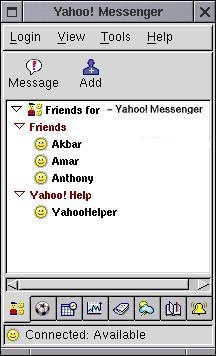
Yahoo messenger is one such IM tool which is most widely used, but for those use ubuntu linux, redhat linux or any other version of linux always miss yahoo messenger.

yahoo-messenger-linux

There are two versions of yahoo messenger available for linux build, the official version of yahoo messenger can be downloaded from here, but it lacks in major yahoo messenger features like webcam, voice chat and photo sharing etc, so it can be used to for text chatting.

One more way to install yahoo messenger is given below

1. Install libssl0.9.6 through Synaptic or type the following on the terminal

sudo apt-get install libssl0.9.6

2. Download this file from messenger.yahoo.com.
3. In the terminal, write the following command

sudo dpkg -i /path/ymessenger_1.0.4_1_i386.deb

replacing path with the path to where you downloaded the file.


4. Run /usr/bin/ymessenger and follow instructions to setup Yahoo! Messenger.

Another version of yahoo messenger is implemented using Gyachi which is a yahoo client for linux which supports almost all the features of yahoo messenger including all mentioned above including photo sharing, voice chat, file sharing, group chat etc and lots more.

You can download Gyachi for the following versions of ubuntu from the links given below.

Ubuntu Jaunty packages:
gyachi_1.1.70-1~jaunty_i386.deb
gyachi_1.1.70-1~jaunty_amd64.deb

Ubuntu Intrepid packages:
gyachi_1.1.70-1~intrepid_i386.deb
gyachi_1.1.70-1~intrepid_amd64.deb

Ubuntu Hardy packages:

https://launchpad.net/%7Eloell/+arch…ntu11_i386.

Split MP3 Files with Split MP3

Posted by Laxman Kudva in

Split Mp3 is a free application using which you can easily split your Mp3 files very quickly. The program requires no technical knowledge and any one can quickly split a file and save it directly without any conversion being involved.

The interface is pretty simple. Just load the Mp3 file, mark the start point and the end point and select “Direct Save” or “Convert Save” to save the Split Mp3 file. The Direct Save will save it directly while you can also convert the output file to WAV, AAC, WMA, FLAC, M4A or AC3 format. You can also change the Bit rate thus having more control over the final size and the quality.

The program is a freeware and works on Windows.

Download

Aviary: A Free Collection of Online Image Editing Tools

Posted by Laxman Kudva in


Edit images, create mind-blowing effects, design logos, find colors, collaborate, and more. All you need is a web browser! Its Free!

Aviary is a company developed by a large number of people and by the developers of worth1000.com.

This site is having a number of tools (all free) (still in beta) to create and even edit your images online. It includes “Peacock” effects editor, “Raven” Vector Editor, “Toucan” colout swatches and more.. (there are more to develop soon)

Peacock can be used as a Photoshop alternative and Raven as illustrator alternative. They both support all of the features including custom fonts, filters, pen tool and much more.

Having a large tutorial database and a good community, this site attracts many users and that’s why they are developing more free tools. Probably, there next tool can be a 3D image editor (still in development).

The above image is also developed by their own online software peackock.

There is no limit on how you make and how much time you take so be creative and start creating some beautiful art.

Link: Aviary

Unlocker - No More "Error Deleting File or Folder" [Windows Downloads]

Posted by Laxman Kudva in

If you are Windows user then you might have seen something like below in past:

image

There are other similar error alerts like…

  • Cannot delete file: Access is denied
  • The source or destination file may be in use.
  • The file is in use by another program or user.
  • Make sure the disk is not full or write-protected and that the file is not currently in use.
  • etc…

Most of the times files/folders are locked by some applications you may not know. So even closing application in doubt doesn’t solves problem.

I often get this error so was wondering if there any way to unlock the file/folder I want to move/delete. Thanks to Google, I found this nice application named Unlocker

#How-To Use

0. Click here to download Unlocker (size: 190KB). Setup is simple and quick. After installing…

1. Just right click on file/folder and select Unlocker from context menu as shown in following screenshot…

image

2. A window with list of applications having lock on file/folder will appear

image

3. Select Unlock All or any other option. Its your choice!

More info, FAQ and a comparison chart with other similar softwares is on official Unlocker webpage!

Hope you will find this useful at some point in time… :-)

Unlocker Links: Download | Homepage

How To Delete An “Undeletable” File?

Posted by Laxman Kudva in

image To delete a stubborn, “undeletable” file from your computer, here are some of the things that you could try…

Method 1:

  • Open a Command Prompt Window and leave it open.
  • Close all open programs.
  • Click Start > Run and enter TASKMGR.EXE
  • Go to the Processes tab and End Process on Explorer.exe.
  • Leave Task Manager open.
  • Go back to the Command Prompt Window and change to the directory the AVI (or other undeletable files) is located in.
  • At the command prompt type: DEL where is the file you wish to delete.
  • Go back to Task Manager, Click on File > New Task and enter EXPLORER.EXE to restart the GUI shell.
  • Close Task Manager.

Method 2:

  • Open Notepad.exe
  • Click File >Save As…
  • Locate the folder where your undeletable file is
  • Choose ‘All files’ from the file type box
  • Click once on the file you wish to delete so its name appears in the ‘filename’ box
  • Put a ” at the start and end of the filename
    (the filename should have the extension of the undeletable file so it will overwrite it)
  • Click save
  • It should ask you to overwrite the existing file. Choose “yes” and you can delete it as normal.

Method 3:

Here’s a manual way of doing it.

  • Start
  • Run
  • Type: command
  • To move into a directory type: cd C:\*** (The stars stand for your folder)
  • If you cannot access the folder because it has spaces for example Program Files or Kazaa Lite folder, you have to do the following. Instead of typing in the full folder name, only take the first 6 letters, then put a ~ and followed by 1 without spaces. Example: cd c:\progra~1\kazaal~1
  • Once you are in the folder of the non-deletable file, type in ‘dir’ - and a list will come up with everything inside.
  • Now, to delete the file, type in del ***.bmp, txt, jpg, avi, etc. If the file name has spaces you would use the special 1st 6 letters followed by a ~ and a 1 rule. Example: if your file name was bad file.bmp, you would type once in the specific folder through command, del badfil~1.bmp and your file should be gone. Make sure to type in the correct extension.

Zorton Mp3 Media Studio is All In One Mp3 Application Suite

Posted by Laxman Kudva in

Zortom Mp3 Media Studio is an all in one Mp3 application suite using which includes like Mp3 organizer, tag editor, CD Ripper, Mp3/Wav converter, Lyrics finder, cover finder and a playlist manager. It even has an Auto Tag feature using which you can tag your Mp3 files automatically with cover arts, artists, lyrics, year etc. All the information is looked online at the Zortom database.

You can also catalogue your collection manually by editing the tags your self. It can also rename the Mp3s based on tag data. The program also includes a CD Ripper with CDDB support that allows you to rip tracks from audio CDs and save them as Mp3 files. It also includes a Converter which can convert between Mp3/Wav and Wav to Mp3. You can also use it to add Karaoke files to your Mp3. All these features also support Batch processing and allow you to work with multiple files simultaneously. It has a nice Duplicate finder which helps you in finding duplicate Mp3 files. Some of its other features include a Normaliser, playlist manager, lyrics and Cover art search etc.

The program is a freeware and offers a lot of useful utilities. It works on Windows.

Download

WeatherFlash: Weather forecast that you could trust!

Posted by Laxman Kudva in

I’ve known a lot of people who often find it hard to trust online weather websites mostly because different sites give different results, some of which aren’t even recent or accurate.

Well, for all those who have been facing this problem, this attractive yet useful weather website called WeatherFlash could just be the answer.

WeatherFlash is a clean, classy, colorful website that gives you weather forecast for all world cities through dials, graphs and charts. The best past about this website is that the information is constantly updated, which means you can be sure of getting the latest updates for every minute.

How does it work?

WeatherFlash pulls its data from Environment Canada, NOAA, and BBC Weather.

It’s very simple to search for results. You could easily find what you are looking for by entering the name of a city in the search box. The exact climatic data will be triggered by the system within seconds.

clip_image002

clip_image004

My traveler friend recently told me about this website and I personally like it and find it to be trustworthy.

If anyone knows of any better weather website, please feel free to share the links.

Link: WeatherFlash