Get Email Alerts via SMS for Free [India]

Posted by Laxman Kudva in

While traveling or away from the internet, does the thought of missing any important emailimagebothers you? Well, one way could be to get a high-end mobile handset, subscribe to GPRS and then configure an email client on your handset for getting emails updates. What if, you get an option to get alerts of your important incoming emails on your mobile through SMS? You could try the new tool from way2sms.com that helps you achieve the same.

The new email notification alert by Way2SMS helps you receive email alerts on your mobile through SMS without the need of GPRS. Once you activate this service you will never be away from your Inbox.

The service works for multiple Inboxes, be it Gmail or Yahoo. You even get options to configure the alerts e.g. you may not like to receive the SMS from 8 PM to 8 AM in the morning or you may not like to receive email notifications for an email by a particular friend who sends you 10 forwarded emails in a day.

Steps

  • Login to way2sms.com
  • Register your mobile number
  • Verify your mobile number by entering the unique ID you will receive on your mobile through SMS
  • Create an email address on way2sms e.g somebody@way2sms.com
  • Set rules in your Gmail or Yahoo account to forward all or selected emails to your unique way2sms email account
  • Create email alert notifications for your email Inbox if way2sms
  • Configure the alerts as per your time preference
  • Set rules for exceptions, if you want

image

image

Pros

  • The SMS notifications sent by the service are free of cost
  • Multiple email accounts can be configured for the service even from the same service provider (e.g Gmail)
  • You have the option to set exception rules and preferred timings for receiving SMS

Cons

  • The main service of way2sms is to provide free SMS for India. The email notification alerts through SMS is just an add on tool
  • The usability of the site is a bit shabby and you will struggle to get accustomed to it initially
  • You need to login to the service within every 14 days to re-activate the alerts
  • The registration and initial setup process is it lengthy

Said that, I still found this tool to be a good utility. Do not forget to share your experience with us.

Link: way2sms

Restore Accidentally Deleted Files on Your Computer with Recuva 1.25

Posted by Laxman Kudva in

All of us are very much familiar with computer and it’s usages, still we end up deleting some necessary files accidentally few times. It’s fine if we send the file to recycle bin, but if we delete a file permanently from computer it would be a nightmare to restore that. In this case you might need a software that can restore your deleted files easily without much hassles. If you are looking for a tool to protect your files on your computer, try using Recuva 1.25.

Recuva 1.25 is a freeware but works like any other professional tool. Install Recuva on your computer and do a full driver scan. It’s better not to install Recuva in the protected drive. If you want to protect C drive, you should install Recuva on D or other similar drives. After the installation, make a full scan of your protected drive using Recuva, so that it will index the list of files and folders to protect. Once the scanning is done, all your files are protected.

Restore accidentally deleted files on computer with Recuva 1.25

Now if you have deleted a file accidentally, open Recuva and select that file from the Recuva index list. Then choose to restore that file and Recuva will automatically . You can also try using Recuva on memory chips, flash drives, mp3 players to protect your data and avoid any unpleasant circumstances. Now deleting files accidentally won’t get your mood spoiled, for sure!

Recuva 1.25 is compatible with Windows 9x,Windows XP,Windows Vista. Download Recuva 1.25 to restore all accidentally deleted files on your system.

Delete Files Permanently from your Computer with FreeEraser 1.0

Posted by Laxman Kudva in

When you delete a file from your system, it does not get deleted from your hard drive permanently. Marking a file deleted means that you don’t need that file anymore and the system can write or keep any other file on that space. But unless and until system uses that space, the deleted file can be recovered, even after weeks. So, in order to keep your privacy and maintain security, you can use FreeEraser 1.0. FreeEarse 1.0 is a freeware that helps you in removing the deleted files entirely from your system, making them unrecoverable.

Delete Files permanently

FreeEraser creates an recycle bin icon in your desktop. Now whenever you move a file to FreeEaser bin and direct it to delete files, it will delete those files permanently, making them unrecoverable again in future. If you have some confidential data in your computer and want to destroy them forever, this tool will work like a charm for you. No one, even any data recovery software can’t recover your deleted files.

Fasteraser is reallty fast and light on your system. It also warns users before deleting files permanently. You can download FastEraser and try. This is one of the essential tools to protect your privacy.

Digsby: Manage all your IM, Email and Social Network Accounts from one place

Posted by Laxman Kudva in

clip_image002Whenever you go online, how much time do you spend to check all of your emails accounts , browse through updates on your social network accounts and then login to your favorite IMs? Well, you can do away with all these mundane steps just by using the Digsby application.

Digsby is a software product that helps you manage all your IM, email, and social network accounts from one easy-to-use application. It is a free to use application, however it does show a few ads during the installation process for optional software, which you can decline during the setup. Other than that, it uses your CPU’s idle time to conduct computational research. If you wish, then you can even opt out of this as well.

Support

  • IM Accounts: AIM, Windows Live Messenger, Yahoo Messenger, Google Talk, Facebook Chat, ICQ and Jabber
  • Email Accounts: Gmail, Hotmail, Yahoo Mail, AOL/AIM Mail, IMAP and POP
  • Social Networks: Facebook, MySpace, Twitter and LinkedIn

clip_image002[7]

clip_image004

clip_image006

clip_image008

clip_image010

Features

Instant Messaging

  • One combined buddy list for all your Chat Accounts
  • Multiple conversations in tabbed windows
  • Merge multiple accounts of a buddy into one IM account
  • InfoBox to check everyone’s status message and profile easily
  • Change your status in one click

Email

  • Manage all your email accounts right from Digsby
  • Popup notifications when new email arrives
  • The email InfoBox gives you a snapshot of your unread messages with just one click
  • Perform basic actions such as “Mark as Read” or “Report Spam” from the email InfoBox
  • Send emails to your friends from the IM window, itself
Social Networking

  • Stay up to date with everything happening on all your accounts.
  • Receive notification alerts from all the accounts
  • The social network InfoBox gives you a real time NewsFeed of your friends
  • Change your status message for any network in one click

Personalize

  • Customized skins for personal look and feel.
  • Customizable notification system to let you choose what events you want to be alerted about and how.

How to begin?

  • Download Digsby
  • Run the installer
  • Add your accounts
  • Customize your set up – themes and behavior
  • Start using

Digsby offers a complete synchronization between computers and installations. You can even place a widget on your blog, website, or social network profile so that you can chat with your visitors.

Link: Digsby

How to Change Time Using Commad Prompt

Posted by Laxman Kudva in

Well ever wondered how you can change time shown in the system tray using command prompt? If so, try this.
>Open "Command Prompt". (Start->Run, then type in cmd)

>Type in the word "time".To change the time enter the new time desired. An example would be 5:45 pm.

>To enter this time type in 5:45:00 PM.To change the date you enter date in the command prompt. You then enter the date separated by /. (ex 8/20/2008)

Hit enter.

Check the result. The system's time and date should now have been changed using command prompt.

How to Pretend to Hack a Website

Posted by Laxman Kudva in

Go to the page you want to hack and wait for it to be loaded fully. If you do it before, it will only edit what has already loaded.Copy the code into the url bar.
javascript: document.body.contentEditable = 'true'; document.designMode = 'on'; void 0
Hit go! If it worked right the links will have turned a more saturated blue, and when you click somewhere you'll be able to edit textEdit! You can change text by highlighting it and typing.
You can stretch or delete images just by clicking on them. Or you can just highlight the whole page and hit delete! Have fun!
Type the following code to make the page uneditable again:
javascript: document.body.contentEditable = 'false'; document.designMode = 'off'; void 1
Once you have made the page uneditable again, left-click in the URL Bar and press ESC. This will reset the URL to the page you are on, making it look authentic!

Email Hacking -How to Hack Yahoo Accounts ?

Posted by Laxman Kudva in


When i was searching on the net i found many of the people interested in Hacking Yahoo Passwords and many of them asking this type of question in different Form but they won't get any proper reply so i decided why not to write a article about Hacking Yahoo Account Passwords.

Hacking Yahoo Accounts is easy but it is possible only when HE(Target Account to be Hacked) is your friend.

I found one password Hacking program for Yahoo. Yahoo Account can be hacked by using the program called Fake Yahoo Messenger.

Fake Yahoo Messenger:

It is a software appearing like yahoo messenger(old version type)


and when ever some one trying to Log In to there account by this fake yahoo messenger the password will be saved in your PC and also they won't be able to log in to there account because it always show an error as shown below


Steps for Hacking Yahoo Messenger passwords:

1. Install Microsoft.Net Frame Work i think almost everyone has this software in their computer if not click here to download.

2. Download Free tool for hacking yahoo accounts(fake yahoo messenger)

File Size
: 30.54 KB


3. Rename Fake Yahoo Messenger to Yahoo Messenger

4. Tell your friends to Log In.

Hint: If any of your friends asked why your using old version then tell this reasons...

* Faster load

* No ads inside the chat room etc(As i already told that they won't able to log in to there account by using this software than how can they see inside is there any ads ?)

* Or else tell them this is a new beta version and etc..

It all depends on your skills to Log in your friends...

5. After your friends log in open c:\yahoo.txt and that's your friend Yahoo Id and Password.

NOTE: You need to disable your ANTI VIRUS when all this process is going on.

Convert Image Files with 36 Image Converter

Posted by Laxman Kudva in

36 Image Converter is a free application which can be used to convert your image files. Apart from that, it also offers a lot of other features which makes it an ideal tool for photography lovers. It offers various conversion options. Many new users will take time to get familiar with all the options but all the basic features are very easy to use.

The program has a very different interface as compared to other similar programs. It has a black background with all the icons arranged at the top and each icons offers a lot of features. The program supports 36 image formats and you can save and convert between them. It can also be used to Resize, Crop and rotate images. You can also set the transparency of the images. You can also add some cool effects to your images. It comes with some masks and filters to give your images a unique effects. The file types it supports include bmp, jpeg, jpg, gif, png, tif, ico, psd, cut, pic, cel, pbm, pgm, ppm, pdd, bw, rgb, rgba, sgi, rla, rpf, pcc, pcx, icb, eps, fax, tga, tiff, dib, rle, emf, wmf, psp, pcd, tif, icb, jfif, pii, rawpii. It also includes a tutorial to help you get started.

Even though it offers a lot of features, the interface is not the best and may take some time to find the features and get used to it. It is a freeware and runs on Windows.

Download

Carry Your Applications with You on USB Drive with CodySafe

Posted by Laxman Kudva in

CodySafe is a freeware which allows you to turn your USB drive into a “Computer on a Stick”. You can install it on a USB drive and then it can be used to install your favourite applications on the USB drive so that you can carry it with you anywhere. It can also manage all your USB documents along with the applications. Just stick the USB drive into any Computer and work with your favourite applications.

When you plug the USB drive on any Computer and run CodySafe, it will resemble the Windows Vista Start Menu. All the installed programs will be visible there and you can quickly launch them. All your documents can also be accessed from there. You can categorize your documents into different categories like Pictures, Music, Documents etc. All the installed applications can be arranged into groups for easy navigation. You can also customize which application you want to Autorun. It also has a feature called ‘Drive Doctor’ which can check the health of the hard drive. It also has a “Find If Lost” feature which in case your USB drive gets lost, lets anyone who finds it know your contact information so that they can bring it back to you. If you insert your USB drive into any computer and work on it, all the information will get saved into the USB drive only so it will leave no footprint on the host system.

This is a great utility for managing your USB drive and using it more efficiently. It works on Windows XP/2003/Vista and Windows 7.

Download

How To Automatically Repeat / Auto Replay Videos In YouTube

Posted by Laxman Kudva in

I wanted YouTube video auto replay / automatically repeat feature built within YouTube, so that I could play my favorite songs without having to manually refresh the tab / browser. But seems like there is no direct way to get this done unless we use a GreaseMonkey script.

There are so many of my favorite songs that I just love listening to over and over again, but the only problem is, I have to walk upto the system to click on the replay button every time the song/video ends.

But I don’t need to do this any more - with the help of loopy, a GreaseMonkey script, I can auto replay / automatically repeat with the song / video.

Once you have Greasemonkey addon installed on your Mozilla Firefox browser, install Loopy. And you’ll find a small button which says ‘loop’ as shown in the figure below:

YouTube video automatically repeat auto replay

Here’s how you can install Loopy on your PC / Laptop:

1> Download and install Firefox if you do not already have it.

2> Download and install GreaseMonkey add-on to your Firefox and restart it once installed.

3> Install Loopy from here.

4> Open any video on youtube and once the video starts playing click on loop. Initially it’ll be gray / black in color and once it is turned on, it turns red. The video you play, will be in loop until you turn of loopy or choose another song.

How to extract and retrieve text from Images or PDF with Free OCR

Posted by Laxman Kudva in

It’s always good to know that technologies that were once so much expensive and not in reach for a common man are getting just free of cost on the internet.

Sometimes we do click images that have so much of text written on it. But then why waste time digitizing the text by typing.

Free OCR is an online tool which will do the work for you. Just feed the website with an image less than 2MB and it’ll automatically retrieve the text from it and will send it to your email.

We tried writing something on a Notepad, taking its screenshot and then extracting text from it.

sample_text

The conversion was not so bad. If we remove the title and the menu bar it otherwise extracted decently.

This is a sampie tEXt

For huge texts this may be very useful OCR tool. Though the results were not so great if you write something on MSPaint and then try to extract the text.

Search and Download Movie Information and Box Art with Movie411

Posted by Laxman Kudva in

Movie411 is a free application using which you can search and download movie information along with the DVD box art. If you are a movie collector and has a good collection, you can make it even better by storing the complete details and covers for each movie.

The interface of the program is very simple. Just enter the name of the movie and click ‘Search’. It will show you all the matching results, just select the result that you want and click on save and it will downloaded to your Save location. You can select which information you want to save which include movie information, Front Cover and Back Cover. You can quickly preview each result be selecting it. You can also select the Online Movie Database which you want to search. It collects and saves all the movie information in an easy to read text file.

The program is quite useful if you have a large movie collection and you want to complete it by having all the DVD covers and information. It is a freeware and runs on Windows 2000/XP/2003/Vista and requires .Net Framework 3.

Error after Software Installation

Posted by Laxman Kudva in

As most of our tasks have become computer based, computers acts as an important part of our live. It is useful for both children and adult. Most of our business errands rely on computers for example printing, creating reports etc. Sometimes it becomes necessary to install new software according to the requirement of the user. Here comes the topic for today, it may happen that when you install any new software in your computer system, you may face some errors regarding the same. In this article today we will see what could be the fundamental reason for an error and measures to troubleshoot the issue.

Most people generally install drivers and other application software for their daily purpose. After installing such software you may encounter issues with the same application. There can be any reason for the issue, some of the basic reason may be, improper installation of the software, broken files in the program and software conflict etc. Software conflict can be explained as, the software install is not supporting some other software or some other application is not allowing the software to run properly.

To overcome such problems, you first need to uninstall and then re-install the software that you want to implant. After you have re-installed the software examine whether the error still occurs. Remember after installing the application if you are unable to start your system normally, try and boot into ‘safe mode’. It may also happen that the software you installed has broken files or is corrupted. Check for another copy of the version or updates and try installing this new edition of the software. If you think that it is the matter of software conflict, try to uninstall software which you think are the culprit. This should be done only if the software you installing is very important. Otherwise you may end up uninstalling some other application which is crucial for you.

Meebo

Posted by Laxman Kudva in

Internet is a very vital source for reliable information. It acts as a supplier of entertainment and knowledge. However, one of the best functions of internet, that is appreciated internationally, is its techniques that allow us to communicate even to distant areas. This makes internet an important aspect and now it is one of the daily requirements of most people.

As the advancement of word wide web, it has many changes through the span of time. There were various new introductions to internet. As new technologies were established for example, RSS feeds, Java Applets, etc, internet became better and more advanced with every introduction to it. Gtalk, Yahoo messenger, MSN messenger etc are some of the tools that enable us to communicate with friends. These are the tools that provided instant messaging ability to the user. However, going away from these tools, there is something which is a combination of these tools. In simple terms to chat using Gtalk or Yahoo you need to have an id with respective portals. But Meebo, again an efficient source of instant messaging, is something different from the above motioned instant messaging platforms.

Meebo is a portal which redefines the way of communication over internet. It is a site which allows you to logging to different ids using just one site. For example you can sign into Yahoo and Gtalk at the same time by just entering both the ids and passwords on the Meebo page, in their respective fields. Meebo allows user to log into four different sites at one go namely, Yahoo, Gtalk , MSN and MySpace. This is just the fundamental function of Meebo. Looking into some interesting features of Meebo we can any time highlight the video chat facility offered by the portal. It also allows to do voice chat, through VoIP functionality.

Apart from these there are many interesting things that Meebo has stored for its users. Signing up with Meebo is free of cost. There are many rooms that you can enter and enjoy the privileges of instant messaging.

How to transfer mail from Yahoo to Google account

Posted by Laxman Kudva in

Gmail recently added a feature which lets you import all your mails from any mail account which supports POP3. Yahoo Mail does support POP3 for its Plus users and now its easy to get all this in gmail account.

This is useful if you are no longer using those accounts and are just there because you have some mails which you always want.

To import Yahoo mails into Gmail

  • Go to Settings > Accounts
  • Look for Get mail from other accounts: (Download mail using POP3)

Once you click on it, Gmail will ask you for the email id and then it will pick up the supported pop3 address and url automatically. Here is a sample with Yahoo Mail Import :

Transfer mail from Yahoo to Google

This is similar to any POP3 if you had used in Outlook. You can configure to delete the messages on Yahoo inbox, what will be the level, do you want it in inbox etc. I wish one day Yahoo opens up pop3 for all Users and everybody can do it.

What to Do when Ur Orkut , Gmail ,Blogger Account is Hacked!

Posted by Laxman Kudva in

Here you are going to see what you want to do to get back your Google account once it has been hacked its because all your Google services like Gmail, Orkut, Google Calendar, Blogger, AdSense, Google Docs and even Google Checkout are tied to the same account.If you lose any of your above account you have to face problems in dealing with other google applications also.

Here are some options suggested by Google Support when your forget the Gmail password or if someone else takes ownership of your Google Account and changes the password:

1. Reset Your Google Account Password:Type the email address associated with your Google Account or Gmail user name at google.com/accounts/ForgotPasswd - you will receive an email at your secondary email address with a link to reset your Google Account Password.This will not work if the other person has changed your secondary email address or if you no longer have access to that address.2. For Google Accounts Associated with Gmail If you have problems while logging into your Gmail account, you can consider contacting Google by filling this form. It however requires you to remember the exact date when you created that Gmail account.

3. For Hijacked Google Accounts Not Linked to GmailIf your Google Account doesn’t use a Gmail address, contact Google by filling this form. This approach may help bring back your Google Account if you religiously preserve all your old emails. You will be required to know the exact creation date of your Google Account plus a copy of that original “Google Email Verification” message.

It may be slightly tough to get your Google Account back but definitely not impossible if you have the relevant information in your secondary email mailbox.

Access Your Folders as Drives ( Virtual Drive Creation )

Posted by Laxman Kudva in

You can create Virtual Drives in your Computer. Now you can access your Favorite Folders as a drive in My Computer.
What you can do ?
1)Access your folders as a Drive !
2)Fool 'Computer Beginners' or your 'Friends' (Non-Expert) , as the drive will show Disk Space of the folder's drive so it seems that the disk space has increased !!!
Do The Follwing :
► Start >> Run
► Type cmd and hit Enter
► This will open "Command Prompt"
► Type subst Z: E:\folder and hit Enter key.
→ You can replace Z: with your desired New Drive Letter (Except existing Drive letters)!
→ You can replace E:\folder with the path of your favorite folder !
► Now, type exit
This creates a new drive ! When you open this , it will open your folder !!!
Issues To Consider:
If On Restart the Virtual Drive Disappears !!!
Solution:
We can make a batch file which will make the drive everytime on startup.Here is how ?
► Open Notepad
► Type :
@ECHO OFF
subst Z: E:\folder
exit
► File >> Save As...
► Name it : Virtual Drive Emulator.bat
► Start >> All Programs
► Right Click on Startup >> Open
► This open the Startup folder
► Paste the Virtual Drive Emulator.bat file here !
Thatsit, now the drive will automatically be created when ever you start your pc

Move Firefox Tabs From Top To Side

Posted by Laxman Kudva in

firefoxMany experienced Windows users have moved the Windows Taskbar from the bottom to the side. This offers several advantages like displaying more tabs at the same time without grouping them or saving horizontal screen estate. These users on the other hand rarely think about moving the tabs of the web browser to the side which is strange as this offers the same advantages. This is especially true for widescreen computer systems and systems with large computer monitors that run on a resolution that almost no websites make use of completely.

One of the Firefox add-ons that can move the tabs from the top to the side is the excellent Tree Style Tab add-on which comes with dozens of configuration settings. The add-on will automatically move all open tabs to the left side of the web browser by default with the option to move it to the right, bottom or top as well. The add-on comes with several visual themes to change the appearance of the tabs in the sidebar.

web browser

More important than that are the advanced configuration settings. Child pages of a website already open in a tab will be opened beneath that tab with the option to hide them if the main page is not selected.

The Tab Operations tab can be used to fine tune how and where new tabs are created and how tabs are opened in the web browser. It is for example possible to add new tabs as a child of the active tab even if the domain names do not match.

tree style tab

It is basically possible to configure the add-on to work exactly as wanted. Hiding tabs is for example a very useful feature for users who work with dozens of tabs. Users who rarely open more than ten tabs on the other hand might not find it as advantageous.

Tree Style Tab offers an interesting alternative by allowing users to move tabs from the top to the side of the web browser.

Create a 3D logo with The GIMP

Posted by Laxman Kudva in

Any of you that do any graphic design or web development know how important it is to have tools at your disposal to handle just about any task that might come your way. And even if you don’t have graphic design skills you will, someday, have to create something quickly to use for a web site, or presentation, or just about any other media. When that day comes, and you need to create a quick, professional looking logo, be glad you have The GIMP.

With The GIMP, creating rudimentary 3D logos is painless…if you know the steps. And with a good collection of fonts you can make your clients think you have far more skills than you might actually have. With that in mind, let’s take a look and see just how simple it is to create a 3D logo with The GIMP.

How it works

The GIMP has a built in feature that helps you to create these logos. We will be working with version 2.6 - which is actually important because the engine that creates these has changed as well as the location of the submenu has changed. So if you don’t have 2.6, give upgrading a go.

The process is pretty simple.

  • Select the type of logo you want to create from the Create menu.
  • Enter all of the necessary information and select the configurations to suit your needs.
  • Click OK
  • Edit the image to suit your needs.
  • Save the file.

Now let’s take a look at the process with a bit more detail.

The logo tool

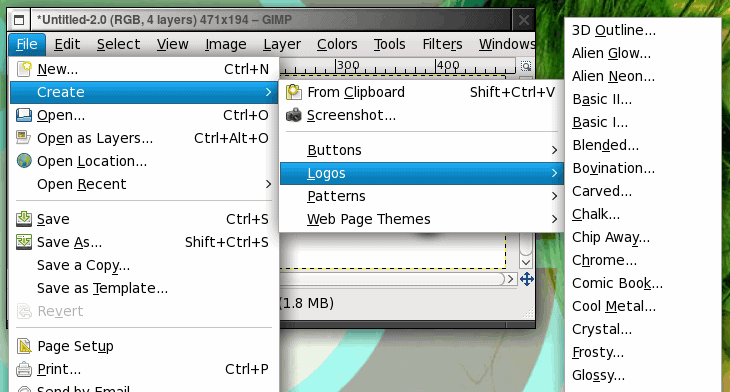
Figure 1

Figure 1

To open up the logo tool go to the File menu and select the Create submenu. From with the Create submenu you will see the Logos submenu, click on that to reveal the different types of logos you can create (see Figure 1).

The different types of logos range from the cartoonish, to the professional, to the nearly-fantastical. There are quite a few choices so your best bet is to play around with them until you find the type of logo you prefer to work with.

Figure 2

Figure 2

Once you click on the logo type you want to create a new window will open. It is within this window that the logo is created. The good news is, you really need zero artistic skills to tackle this task.

Figure 2 shows all of the configuration options you will have to deal with to create a logo. Don’t let amount of options fool you, you really only need to work with a minimum of these to create your logo. Here’s what you’ll need to work with:

Text: This is what your logo will say.

Font: This is the font you want to use for your logo.

Blend Gradient(s): These will be the gradient colors you will use for your logo. You can create new gradients as well. The included gradients should be plenty to get you started.

Background Color: If you know the color of the background your logo will be going over you can change this here. I usually delete the background color so the logo is surrounded by a transparent border.

Figure 3

Figure 3

And that is the bare minimum you need. Once you have all of that filled out, click OK and the logo will be created.

Figure 3 shows a sample logo created using the Glossy logo tool, the Biometric Joe font, and the Cold Steel 2 gradient.

Of course there are plenty more options to configure for your logo - but getting the hang of the basics will give you plenty to do with this tool.

Figure 4

Figure 4

TIP: As I mentioned I tend to remove the background in this logos. What this does is allow my logos to be placed on any color background. To do this go to the layer window of your new logo, select the background layer, and click the delete button in the layer window. When you save this image you will now want to make sure you save it in a format that supports transparency (such as .gif or .png.)

Watch TV And Video With StreamTorrent

Posted by Laxman Kudva in

StreamTorrent is a free software program for the Windows operating system that allows users to watch - and stream - TV and videos over the Internet. The relatively unknown application provides access to hundreds of popular TV stations including BBC One, BBC Two, ESPN 360, Fox Sports 2, ESPN and HBO. The software uses P2P technology that is popular in similar applications like TVU Player which means that the computer’s bandwidth is used to stream the contents to other users.

Users start by clicking on File > Search in the menu to open the search interface which can be used to list all available channels or filtered channel lists either by keyword or pre-selection (e.g. sports, top 100). It is also possible to enter a keyword which will search for and return all channels matching that keyword. A good start is probably the top 100 channel list.

watch tv online

It takes a few seconds to populate the channel list which displays one channel per row. Each row includes the name, bitrate, quality, audience and other values. The most important are the bitrate, quality and audience as these are indicators on the quality of the picture and the bandwidth that is needed to watch the channel fluently.

A click on a channel with open an internal viewer that is connecting to the selected tv channel. This process can also take some time as the StreamTorrent begins the buffering process.

watch tv

The player offers basic status information and controls including a buffer bar, changing to full screen and changing the volume.

watch hbo

Watching tv is probably the most popular use of StreamTorrent. It is possible to add new channels to the application and to start a live stream from the local computer system.

Automatic Image Resizing Software Shrink Pic

Posted by Laxman Kudva in

image resizing softwareThe size of digital photos and images has increased tremendously in the last years. Sizes larger than one Megabyte are not uncommon these days which becomes problematic when emailing photos or uploading them to websites on the Internet.

Most users resize photos before they email or upload them. This does become a nuisance if the process is done regularly, for example when uploading photos to blog posts. Shrink Pic automates the image resizing process by actively scanning for photos that get uploaded by the user to the Internet. It will for example detect photos that get uploaded to a Wordpress blog or those that get added to the Microsoft Outlook email client.

shrink pic

The image resizing software comes with a few options to handle the automatic process. It is for example possible to select the image formats that should be resized automatically by Shrink Pic and to change the compression level of the images.

The compression level is determined by the size of the image and the jpeg quality level. The high compression level reduces the size of the image automatically to 640×480 and applies a jpeg quality level of 85 while the low compression level changes the image size to 1024×768 instead.

This is unfortunately one of the disadvantages of the software as it is not possible to make the program keep the aspect ratio of the image.

The image resizing software will notify the user about the file size changes and keep track of overall statistics as well.

Shrink Pic is therefor a viable alternative for users who work with standard sized image formats only.

[HOW TO]Assign a Permanent Letter to a USB Drive

Posted by Laxman Kudva in

If you have multiple pen drives you might have noticed that every time you put in your drive it will be assigned a different drive letter.

This can be frustrating when trying to run backups or opening files from software as recent drive letter is changed. Even if you have created playlist of the songs which are in your pen drive it won’t work if the drive letter is changed.

Here are the steps you will have to follow to assign a permanent drive letter:-

1. Go to Start > Run

2. Type mmc in the box and hit enter.

3. Select File > New

4. Now select File > Add/Remove Snap-in.

5. Select “Disk Management” and click “Add

6. Select “OK“.

7. Select “This computer” and then “Finish

8. Now press “OK” on the “Add or Remove snap-ins” screen.

9. Now select “Disk Management” from the left menu.

10.You will now see all of your drives/partitions in the right hand side panel.

11.Right click the USB drive you want to assign a permanent letter to and select “Change Drive Letter and Paths…

12. Click on “Change

13. Select a permanent letter

14. Click “OK

15. It will warn you about making the change - there is little chance programs you use will be affected by this. If they will, you will probably already be aware of this so don’t worry.

16. The final step is to select File > Save and save the file in the default directory. Close the Console and you are done.

Now eject your usb drive and put it back in and see whether it is showing the assigned letter or not.

For a Safer XP, Close The Unwanted Services

Posted by Laxman Kudva in

To disable unneeded startup services for a safer, faster XP, use the "Services" Admin Tool (Control Panel > Administrative Tools > Services). If you are a single user of a non-networked machine, you can disable the following items, with no ill effect.

Alerter
Clipbook
Computer Browser
Fast User Switching
Human Interface Access Devices
Indexing Service (Slows the hard drive down)
Messenger
Net Logon (unnecessary unless networked on a Domain)
Netmeeting Remote Desktop Sharing (disabled for extra security)
Remote Desktop Help Session Manager (disabled for extra security)
Remote Procedure Call Locator
Remote Registry (disabled for extra security)
Routing & Remote Access (disabled for extra security)
Server
SSDP Discovery Service (this is for the utterly pointless "Universal P'n'P", & leaves TCP Port 5000 wide open)
TCP/IP NetBIOS Helper
Telnet (disabled for extra security)
Universal Plug and Play Device Host
Upload Manager
Windows Time
Wireless Zero Configuration (for wireless networks)
Workstation

How to Remove Shutdown Button on Logon Screen

Posted by Laxman Kudva in

Having the shutdown button displayed on your Windows XP logon screen can be very inconvenient at times. Your kids or any people that are sharing your computer can accidentally turn off your computer and close all you programs. To prevent this from happening you can just easily disable the “Turn off computer” button.

windows-xp-logon-screen

You can do this in two ways. One is through the Administrative Tools and and second is by editing some registry value.

If you don’t own a Windows XP professional machine then editing the registry will be your only choice. But before you do that make sure that you make a backup of your registry.

Step 1: Disabling using the Local Policy Settings

1. Go to Control Panel

2. Click on Administrative Tools

3. Click on Local Security Policy

4. Under Local Security Settings Go to Local Policies then Security Options. Scroll down, look for “Shutdown: Allow system to be shut down without having to log on”

local-security-settings

5. Double click “Shutdown: Allow system to be shut down without having to log on” then select “disabled”

disabled-shutdown

Step 2: Registry Editing

1. Click on Start, Go to Run then type Regedit

2. Navigate to the following key:

HKEY_LOCAL_MACHINE\SOFTWARE\Microsoft\Windows\CurrentVersion\policies\system

shutdownwithoutlogon

3. Change the value of ‘shutdownwithoutlogon‘ to ‘0′.

Picture Collage Maker: The fast & easy way of creating a collage!

Posted by Laxman Kudva in


Now you would never have any hassles in making collages for your daily use! Picture Collage Maker will handle it for you! It is a very simple to use program which can turn your ordinary photos into stunning keepsakes. You can also share them with your family and friends! With some few clicks, you can create digital collages, scrapbooks, posters, invitations, calendars, and greeting cards. Amazing, isn’t it?

Features

  • Build collages quickly and effortlessly in 3 easy steps
  • Over 2,300 collage resources (frames, masks, clip arts, backgrounds)
  • Already includes 48+ templates to help you in building collages
  • You can also share your collage through any medium - including desktop wallpaper, printed copies, email, etc.
  • Extremely powerful, fast and easy

You can view the full feature list here. Mouth buttering features, aren’t they? Then what are you waiting for, go and download the free version! You can also upgrade to professional edition at a small cost or view the comparison between the free version and professional edition.

System Requirements

You need the following requirements to install this software:

  • Microsoft Windows 98/Me/NT4/2000/XP/2003 Server/Vista
  • DirectX 8.0 or higher
  • Pentium 4 or higher
  • 128MB RAM or more
  • 20MB hard disk space for install

Screenshots

Picture Collage Maker Screenshot

pcm2

Picture Collage Maker Screenshot

You can view more screenshots here.

Perform Personal Online Chat with Command Prompt (no chat software needed)

Posted by Laxman Kudva in

If you want to do personal chat and if you want to be secure enough that your chat conversation wont get saved anywhere you can prefer chatting with command prompt.For this you don't need to download any yahoo messenger.All you need is your friends IP address and Command Prompt.
Firstly, open Notepad and enter:
@echo off
:A
Cls
echo MESSENGER
set /p n=User:
set /p m=Message:
net send %n% %m%
Pause
Goto A
Now save this as "Messenger.bat". Open the .bat file and in Command Prompt you should see:
MESSENGER
User:
After "User" type the IP address of the computer you want to contact.
After this, you should see this:
Message:
Now type in the message you wish to send.Before you press "Enter" it should look like this:
MESSENGER
User:27.196.391.193
Message: Hi
Now all you need to do is press "Enter", and start chatting!

See all rapidshare folders

Posted by Laxman Kudva in

See all rapidshare folders

Use following keywords in google see all rapidshare folders available on internet.

site:rapidshare.com inurl:users "*"

site:rapidshare.de inurl:users "*"

site:rapidshare.com inurl:files "*"

site:rapidshare.de inurl:files "*"

site:rapidshare.com inurl:users (pass|password)

site:rapidshare.de inurl:users (pass|password)

Suppose u need some info on hacking.Then u can try following keywords to see all rapidshare folders having any hacking related thing in it

site:rapidshare.com inurl:users "hack"

site:rapidshare.com inurl:users "hacking

Extract Audio from Video [Free Windows Software]

Posted by Laxman Kudva in

If you are wondering that how you can extract audio track from a video file, then here is a way that you can use to get your videos to be converted to an audio format. We often find music tracks we like on YouTube. Many time we are just interested in audio part of such videos.

I used a freeware software for this purpose - AoA Audio Extractor. It is very easy and simple to use. You just need to add files, select them and click Start button. You can also play with advanced custom settings.

audioextract

This will help you encode your video songs to audio and then you can also transfer them to your iPod, music player or mobile phone. Here is a hint to make productive use of it.

Download videos from Youtube and get them converted into audio and transfer to your mobile and enjoy! ;-)

Links: Product Homepage | Download Product

Explore&Burn - CD/DVD Burning Integrated With Windows Explorer

Posted by Laxman Kudva in

Explore&Burn is a free tool which integrate the free CD/DVD burning with in windows explorer. It could prove to be the best and quickest way to burn files and ISO images on your computer to CD or DVD drive as itself integrates with windows explorer.

explore-and-burn-Progress

It is extremely easy to use lightweight among all the other free burning applications.

More importantly it integrates itself into windows explorer so you just need to select the files you want to burn on the cd/dvd and right click and then select burn to disc

burn-to-disc

Some Concluded Key Features Of Explore&Burn Are:

1. Just select the needed files in windows explorer and burn it in the CD or DVD

2. You can easily burn ISO images easily

3. Burn on CD-R, CD-RW, DVD-R, DVD+R, DVD-RW, DVD+RW and DVD-RAM discs

4. It supports ISO-9660, Joliet and UDF file systems

Note: It is completely free software and contains no adware or spyware.

Download Explore&Burn

Block or unblock any website from your computer

Posted by Laxman Kudva in

Do you wish to block or unblock any website from your computer? You can set your computer to open the sites that you wish and block the ones that you don’t want to. Here’s how you can block or unblock any website from your computer:

1.Open your C: folder. ( or Any drive where you have installed Windows)
2.Navigate to Windows folder and search for Systems32 folder inside it.
3.Find a folder ‘drivers’ and then another folder etc inside it.
4.Now your full path should be C:\Windows\System32\drivers\etc
5.Inside the etc folder, look for a file named as hosts.
6.Open that hosts file with any text editor like Notepad or Wordpad
7.Scroll to the bottom and you can find a line there as 127.0.0.1 localhost.
8.Just below that line add this >> 127.0.0.2 (site name)
9.Now Save the file and exit.
10.You are done.

To unblock the site:
Simply go to hosts file and delete 127.0.02 (site name). You can now access the site from your computer.

Does When u Double click on the Drive.New Window opens?

Posted by Laxman Kudva in

Whenever people double-click on any folder in Computer, it opens in a new window even if selected the option “Always open folders in same window” in “Tools -> Folder Options”.

If you experience this kind of Problem then do download following zip file, extract it and then run .REG file and confirm the action:

click here to download zip file

Quickly Search files on Windows drive with Ultra File Search

Posted by Laxman Kudva in

Searching for files in Windows in usually not very fast if you are not using the indexing service of Windows which comes by default in Windows Vista.

So every time you search for files or folders, it searches the data one by one browsing each and every folder for your particular query. This definitely takes time as there is no database indexed for the system files.

Ultra File search is very light weight utility which can quickly find Files, Folders and text on your Local Drive, Network Drives or even external USB or Flash drive including CD and DVD Rom too.

What’s the difference between indexing software and Ultra File Search ?
As you know there are couple of software like Google Desktop search which keeps on indexing files in the database. This hogs up the computer resources and takes so much of the disk space.

Windows Quick Search with Ultra File Search

Ultra File Search uses light weight SQL lite for the file monitoring but never indexes the files. This means, faster search without compromising speed and resources of your system.

And it can also search for text inside the files. And you can also export the results inside CSV, HTML , XML or a plain text file and you can also sort the results by column.

Recently we discussed How to Add Vista like start Menu search in Windows XP with ViStart which gives around 400% faster results than normal Windows search. But if you are not interested in Start Menu search you should definitely try Ultra File Search.

Install VLC Media Player in Ubuntu

Posted by Laxman Kudva in

The VLC media player is an open source player, distributed under the GNU General Public License. It is a highly portable multimedia player that supports many audio and video codecs and file formats as well as DVDs, VCDs and various streaming protocols. It is able to stream over networks and to transcode multimedia files and save them into various different formats.


It is one of the most platform-independent players available, with versions for Linux, Microsoft Windows, Mac OS X, BeOS, BSD, Windows CE, and Solaris.

Install VLC Media player in Ubuntu

You need to make sure that you have a “universe” mirror in your /etc/apt/sources.list

sudo apt-get update

sudo apt-get install vlc vlc-plugin-esd

This will complete the installation

If you want to open VLC You need to go to Applications—>Sound&Video—>VLC Media Player

Once it open you should see the following screen

VLC Media Player Version Details

VLC Media Player Skins 2 interface

VLC Media Player Skins

If you want to download VLC Media Player Skins check here

Install VLC Plugin for Mozilla Firefox

sudo apt-get install mozilla-plugin-vlc